


⌨️ Elevate your control game with the iPazzPort – small keyboard, big power!
The iPazzPort Upgrade Mini Bluetooth Keyboard combines dual wireless connectivity (Bluetooth 4.0 and 2.4Ghz RF) with a rechargeable 800mAh battery and RGB backlit keys. Its compact QWERTY layout includes a high-sensitivity touchpad with adjustable speed, making it perfect for seamless control of Fire TV Stick, Android TV boxes, PCs, and gaming consoles. Designed for portability and versatility, it’s the ultimate travel-friendly keyboard remote.

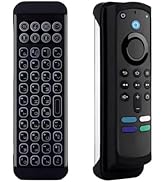


| ASIN | B08LZF253L |
| Batteries | 1 Lithium Ion batteries required. (included) |
| Best Sellers Rank | #564 in Computer Keyboards |
| Customer Reviews | 3.8 3.8 out of 5 stars (2,283) |
| Date First Available | October 26, 2020 |
| Is Discontinued By Manufacturer | No |
| Item Weight | 4.3 ounces |
| Item model number | KP-21SM |
| Manufacturer | UNISEN LIMITED |
| Product Dimensions | 4.6 x 1.6 x 0.3 inches |
B**K
Great little media keyboard that works with Windows, Android, and Linux
I've tried many Bluetooth mini-keyboards with touchpads and d-pads and this one is now my favorite. I'm currently using it with Linux-for-Tegra and Tegra TX2NX with the NVIDIA-spec'd RTK8822ce WiFi/BT module and it all works great out of the box. I've also used it with Windows 11 as well as Android and it has performed great in all environments. The backlight is bright and defaults to "off" which is my preference and it uses a BL-5C Li-Ion rechargeable which is popular and I have several of, so when the battery is exhausted, I can just pop in a charged one. That being said, after fully charging it when I received it five days ago, the battery has not needed replacing/charging, so the battery life looks good, too. The controller has a full set of media controls and a proper Android "Home" button as well as a "Windows" meta key, making this keyboard super-handy at a great price.
S**E
My motherboard has a built in Bluetooth and works just fine. The problem is that the Bluetooth on the ...
Well, I got the wrong one since this is a Bluetooth connection model. My motherboard has a built in Bluetooth and works just fine. The problem is that the Bluetooth on the board does not activate until Windows is on the desktop which means if you have to do work with the BIOS or UEFI of your computer you cannot get to the BIOS or UEFI. The company has a 2.4Ghz model that most motherboards activate the USB ports on startup and that model will work at boot up, but not this one. Make sure you are aware of that before buying. Also, make sure you install any Bluetooth drivers first and make sure the driver is the latest for your motherboard or Bluetooth device. Once done then connect, but read on for some tips. The device itself does what is says and it is great using the device with the back-lit. I use to use a wireless keyboard/mouse and the ball part is just no good anymore. Been great for 6 years, but time for something new and this device works. Make sure that you leave the device switch in the power off position, boot your computer and wait to you get to the desktop, then turn it on and it pairs up. In my case if I power up before the desktop it does not sync as the Bluetooth will not connect so probably a timing issue only and nothing wrong with the device. It is great, works so much better with the touch-pad. Depending on your Bluetooth device you may need to open up the security level for this to work as I usually have mine off; meaning I don't want any Bluetooth device to connect to my system so I had to turn that off and it works fine. Still exploring the keys, but all in all the device is great to use and the back light is a savior during movies
J**F
Keys consistently work
I use this for my gaming PC in my living room. It's nice and compact and works better than others I've tried (others can have trouble with the WiFi signal causing keypresses to not occur or duplicate).
A**A
Bad product
Worst keyboard ever, after a short use the keyboard start pressing random button and the ped is moving and pressing left and right
R**R
Seems to work, but...
Just received today and have not fully tested out. As there is a AAA battery option I wanted to try it out, but was disappointed to find that the springs needed to hold the battery in place were missing, so I can only use the included rechargeable battery. I also could not get a solid Bluetooth connection, so am using the 2.4g wireless dongle with my Android TV streaming device. As identified before I purchased, volume cannot be controlled through the keyboard and I must use another controller for this.
I**.
My Firestick didn't even detected this thing.
This thing not even good as paper weight is the worse bluetooth keyboard I've ever had. I was exited when I unpacked the thing. The first thing I did was to charge it fully. The middle red light lit up and stayed lit until it turned itself off. I assumed it was totally charged. I turned it on but the ready light never came on, instead, the yellow light lit kind of weak, I knew it wasn't normal. The next step was to pair it with my Firestick Max 4K. I pressed the pairing key but instead of the blue light to come on, the yellow light on the left lit on. My firestick couldn't detect it. I was so aggravated. I opened the keyboard battery cover and I noticed a USB receptor. I got even more aggravated! THE FIRESTICKS DON'T HAVE USB PORTS!!!! I have an Nvidia Shield with USB ports, so I thought I could use it with my Shield. WROOOOOONG! I plugged the USB detector to my Shield, and the thing started working hahahaha Not really! Yes! some functions worked right of way like the mouse pad, the one click worked but not all the time. The directional do not move the selector side to side, it did up and down but as soon as I got stuck on one side, there was no way to get it out with my new POC Pazzport, I had to use my shield remote to get it off and turn my new keyboard off. I tried it again on the search bar. I had to use the shield remote to get to search. Then I tried to type something and it was terrible. Every time I typed the letter E, the freaking W was typed before the letter E every single time. Since the directional keys were a mess, I had to use the mouse pad to erase the letter W. The same thing happened when I typed the letter C, the X was typed before the C. You may say that all I had to do was to backspace but no; for the simple reason that the letter need was the first one to be erased, I had to erased both but as soon as I typed the letter E or the letter C, the letter W appeared before the letter E and the X before the3 letter C. Very frustrated. I will return this junk. The blue light never came on ever. I knew it was defective as soon as I saw it. I recorded a video that you can watch. It was very hard to make the video because I'm a normal human being only two hands. This is an update. These guys acted so quickly to get me another keyboard I couldn't believe. After they sent me a return shipping label, another nice guy told me to keep the defective one for parts. But at the same time, there was another guy sending warning to return the damn thing. He finally charged my card for an extra keyboard. I was pissed. But I contacted customer service and they credited my credit card right of way. Thanks!
A**R
Amazon also advertises its own China sourced model KP-810-21SBL that is not really from iPazzPort I bought this for the Amazon Fire Stick 4K TV The Amazon knockoff model ( with dongle ) came with very little identification and only a resemblance to the true iPazzPort model. It also did not have a rechargeable battery. Instead takes two triple AAA Could not get it working even when I bought a micro USB splitter to employ the Blue Tooth dongle. After much wasted effort I was able to contact the iPazzPort support number ( Arizona ) and get the real facts from the manufacturer. They knew all about the Amazon knock off model and expressed similar frustration. They were able to point me to the proper Amazon link for the iPazzPort KP-810-21SBL It was only available in the US ( not Canada ) so had to pay exchange rate. When received it worked perfectly as a Bluetooth connected (no-dongle) keyboard for the Amazon Fire Stick 4K. Also had the rechargeable battery. Even the mousepad works as advertised.
R**R
muy decepcionante, es un dispositivo con muy poco alcance, tienen un input lag (tiempo de respuesta) terrible y constantemente con solo levantar el control de la mesa manda como si hubieras presionado el botón de pausa
D**Z
Conecta y usa es fácil de instalar sin problemas , útil y portátil compatible con Muchos dispositivos carga baterías con USB , dice que es Bluetooth pero no directamente se tiene que usar un puerto USB y el adaptador hecho en china
G**N
I ordered a keyboard from another brand and it was supposed to work with my fire stick, after buying usb adapter and trying multiple ways nothing ever worked, so i gave this one a try, i put the usb thing in my adapter then in my fire stick, turned on the keyboard and it worked right away! I am more than satisfied! Everything works, the keyboard is easy to use and makes searching tv shows/movies so much easier. Shipping was fast, thank you for the good product!
I**N
Works great
Trustpilot
2 weeks ago
1 day ago


